
Sinden Shop
Arcade1Up Replacement Lightgun Hardware
Arcade1Up Replacement Lightgun Hardware
受取状況を読み込めませんでした
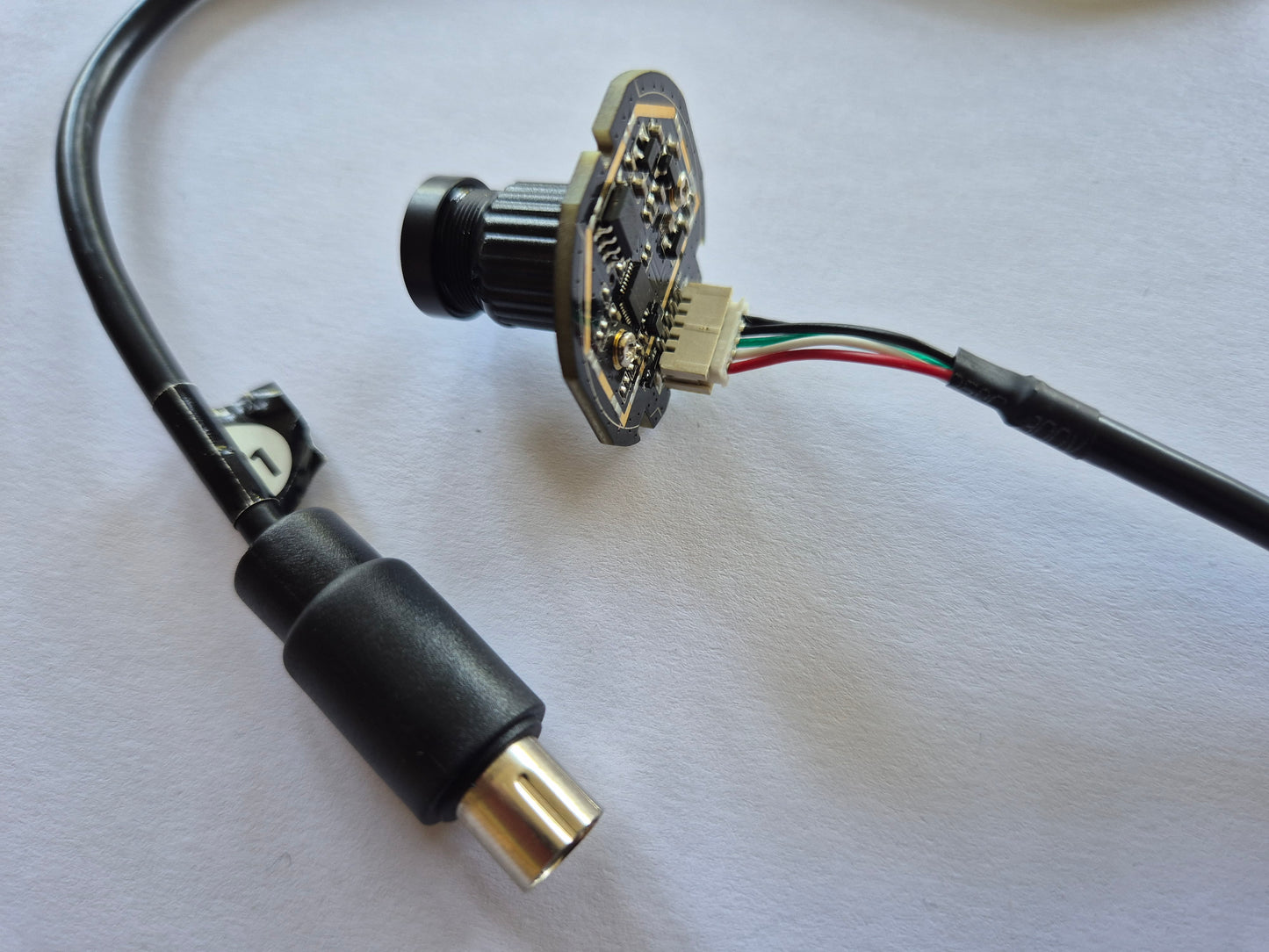
Replacement lightgun hardware for Arcade1Up lightgun cabinets including Big Buck Hunter, T2 (Terminator2) and Time Crisis.
If you have an issue with your arcade1up lightguns then we can hopefully help you, we can sell parts that help with the majority of issues across Big Buck Hunter, T2 (Terminator2) and Time Crisis.
We also with our partner GRS sell a fantastic full replacement shotgun for Big Buck Hunter here:
https://thunderstickstudio.com/products/grs-sinden-target-pro-arcade-lightgun
However we don't sell complete lightgun units for T2 and Time Crisis.
We get a lot of queries about people with faulty arcade1up lightgun hardware who need help, these products are available entirely as a service to the community not an overall profit making exercise. The USB cables are handmade and the custom electronics are purchased in tiny quantities so no bulk discount is available.
Whilst Sinden Technology provided guidance with the hardware and software to Arcade1Up, we didn't design or manufacture the lightguns.
USA orders include USA tariffs.
Please see the below description for each cabinet type including what we sell and the scenarios that it helps in and how to diagnose your issue.
Big Buck Hunter
Recommend the GRS Sinden Shotgun available here:
https://thunderstickstudio.com/products/grs-sinden-target-pro-arcade-lightgun
If you are looking to repair, then we can sell replacement main USB cables and replacement USB cameras, however there are 2 different type of BBH (Big Buck Hunter) lightgun hardware, which we will call generation 1 and 2. Please read the details carefully and contact us if unsure.
Big Buck Hunter Generation 1
The lightgun has a main cable which is actually USB signals. It connects to a small PCB which has a USB hub. One USB hub output goes to a USB camera and one USB connects on the PCB to a keyboard chip. The trigger and pump action buttons connect to this PCB and keyboard chip. If you pull the trigger then it outputs a keyboard "a" and if you do the pump action then it outputs a "b". It is "c" and "d" for player2.
If you connect the shotgun to the BBH cabinet, and it makes a shooting noise when you pull the trigger and pump action, that should imply the main usb cable is fine, and the PCB is fine. Most likely you will need a camera module.
If you get no response at all, then it could be the USB cable or the PCB. It shouldn't be the camera. It is most likely to be the cable in my experience but there is no way to diagnose for sure.
You can look for a USB xbox breakaway usb dongle, these are very cheap and you can then connect the lightgun to a PC. You can test the keyboard buttons in notepad, and you can open windows camera to look for the camera. This helps diagnose a lot better.
We sell the main USB cables and USB cameras. Please note these are not returnable due to the expensive postage and tariffs and additionally with both the USB cables and USB cameras these are modified by hand and take ages. You need to diagnose your issue carefully and order appropriately.
We cannot help with cabinet issues such as faulty PCBs, however we might be able to give some guidance with wiring issues if the lightguns appear to be working fine but can't connect to the PCB.
Big Buck Hunter Generation 2
This hardware is the same as T2 and Time Crisis so please see the below section. However to diagnose whether you have a Gen1 or Gen2 big buck hunter, you can open the shell and look at the camera, you might be able to see this through the front lens. As well as the rear USB connected to it, it also has a small connection on the front for the button inputs. On Time Crisis and T2 you can see this through the front lens, so I assume it is the same for BBH.
Terminator2 and Time Crisis
This hardware has a main USB cable, connecting to a camera module. Additionally a small PCB is connected to the camera module to provide the button presses.
If the USB cable is working and the camera module is OK, then after the cabinets boot, if the lightgun is the only lightgun connected, then it should move the cursor around. If it doesn't, then a replacement USB cable and camera module, should fix your issue (assuming you don't have multiple issues). The camera and USB cable are sold as a pair. As with BBH, please note these cables are hand made and take ages and as well as international postage and tariffs, we cannot accept returns on these.
If the cursor moves, but the buttons don't work, this implies a problem with the PCB which we can't fix. If only one of the trigger and button works, then this could be a replacement button, we are currently looking into these so please let us know if interested. We think the cable and camera module are the most likely issue.
As with big buck hunter, if you buy a Xbox USB breakaway dongle which are available very cheap, you can connect to a PC and diagnose a bit better, by seeing if anything registers in windows, and also if you can see the camera inside windows camera app. If you can't then it is likely a cable and camera combination will fix your issue.
We cannot help with cabinet issues such as faulty PCBs, however we might be able to give some guidance with wiring issues if the lightguns appear to be working fine but can't connect to the PCB. A good example of this, is where only one side of the cabinet works and it works with whichever lightgun is connected.
Please reach out with details of your issue and we can give you advice.
Also if you have a Time Crisis cabinet, please check out our cool Arcade1Up Time Crisis pedal which is made of metal and arcade quality:
Materials
Materials
Tough ABS plastic
RoHS Compliant Electronics
High quality components designed for a long product life time.
Shipping & Returns
Shipping & Returns
Orders are shipped within 2 weeks after order, approximate delivery times are:
UK 48 hours
Europe 3-5 days
North America 7-10 days
Rest Of The World 1-2 weeks
Returns are not yet available as we do not have the infrastructure and business scale to support this.